
Welcome to our, Soft Cover, PUR Bound, magazine Printing faq page
Regardless of if you're from a professional magazine printing compnay, if you're trying to self-publish your own novels or your trying to print your own small-run family history magazine, this page, the below tabs and our online magazine printing tool can sevice the majorotiy of all your small to medium run magazine printing needs. So while we expect that you'll use other magazine printing company quote tools, if you read the below, you'll understand why our clients call us the more accomplished magazine printing company. They are online magazine printers without people. We're a traditional printing company with an online magazine quoting tool.
Magazine Printing Set-up Basics First
Crops and Bleed
What are Crop Marks and Bleed? Crop Marks, AKA Guilitine Marks, are where the printed page will be cropped/chopped off by the Guilitine Blade. So what is Bleed? Bleed is the printed artwork running over all four edges of any and every page by 4mm or 5mm. So why is bleeding important? Any printed page can move in any direction on the press up to 3mm or 4mm. That means if a page was printed 4mm left on a page, and there was no bleed on the right-hand side, then the right-hand side would have a white strip running down the edge where the artwork fell short. The 4mm or 5mm bleed on all four sides allows for the paper to move on the press in any direction up to 4mm without consequence. That also means that the Crop Marks can't touch in the Corners, and need to be pushed out, offset from the center, by at least 2.3mm.
CMYK Print Colours
This subject can be as advanced or as simple as we make it.
All printing files are to be set up with the Colour Format CMYK. CMYK is the abbreviation for Cyan, Magenta, Yellow and Black, the four process colours used to print every other colour.
While that does mean one should change all embedded photos to CMYK, images that are not converted will be automatically converted at the pre-press stage, however, the colours might change slightly.
Images in print
All images must be saved as CYMK and 300dpi. RGB images will not be printed.
100%k Black Vs Rick Black, and text and registration
Not all blacks are equal. 100K is a weaker, more charcoal black than 60C,40M,40Y 100K Rich Black. As the name would suggest the Rich Black is a deeper black, that knocks out more of the white paper underneath the ink. Why is that important? Because rich blacks are made up of 4 colours and that means there's is a greater chance for registration issues. Why? While Rich Blacks are a preferred black for larger block areas of black, fine text should always be type-set as a simple 100K black, because any movement of any of the 4 plates will create a registration issue that will make the text look blurry.
Magazine Gutters
A magazine gutter in a perfect-bound or burst-bound magazine is where the assembled left and right pages create a gutter between them.
The gutter takes the page from being a horizontal plane facing the reader to tipping into the binding, causing the magazine page to lose some area.
This is easy to combat on any stand-alone page, but what about when an image travels from the left page over the gutter onto the right page? In this case, some of the artwork will be lost in the gutter.
So if you have an image or content that travels from the left-hand side page to the right-hand side page in anything other than a horizontal line, the image will be negatively affected by the gutter.
For example: A line will travel into the gutter at a 45-degree angle and not come out the other side at the same position.
That means, when preparing your art file, you might need to move both pages away from the center some additional space (5mm) to allow for what will be lost into the gutter anyway.
Font Paths
If your file is only a one off print than please convert your text to paths / outlines. If you would like us to be able to use the font in file for a web-to-print business card than please export and pack the Indesign file and send it to us whole. Do not outline the text.

PDF files
The PDF file format is by far the easiest and fastest way to send us your print file. Not only are PDF files complete (with no missing fonts or links) but they hold true colour management, trapping and open pre-press information. Most PDF files are small enough in size that they can be sent via email or via our ftp.
Hardcopy Proofing
We can provide online, form and colour contract proofs, depending on the job specifics. Whilst all CMYK prints will have a form and contract proof, it's not always necessary that you see them. For that reason we don't always allow the cost of sending proofs to you. Additionally, on occasion we will put more than one proof on a single piece of paper. Again, if we do this we will not be sending you a proof to check. Please advise upon requesting your quote if you require a hard or soft copy proof.
Sending art via email
If you are sending your files through e-mail, please make sure that you send it in response to the email quote you've received. If you're uploading your art to our FTP than name the file as your company name and job description.
Urgent Deliveries
If delivery is urgent, please nominate the date requirement when quoting in the quote additional field, to check your deadline is achievable.
Read through these tabs in order, or as you need them, for everything you nned to about printing your own magazines
Perfect Binding Vesus PUR Binding
Perfect Binding is the process of gluing the inner pages edges into a combined spine within the cover. It is suitable for light usage and has the disadvantage that single pages may fall out with heavy use.
It's cost-effective and suitable for magazine printing jobs with a spine width of over 4mm wide.
Burst Binding, on the other hand, has notches or perforations in the spine which allows better penetration by the glue. Another significant advantage is that the spine edge is not milled straight like the above perfect binding, leaving the signatures intact and reducing the possibility of pages tearing out. That means burst-bound magazines have better strength and durability than perfect-bound magazines.
Perfect Binding and Burst Binding both present well, but are not suitable for heavy wear usage. They are useful for quality magazines, periodicals, and catalogue publications. They are normally used for publications with 64 pages or more.
Minimun magazine Spine Thickness - 4mm
All glue-bound magazines, whether they are Perfect Bound, Burst Bound or PUR Bound, and regardless of whether they are produced here or at another magazine printing company, need to have a minimum spine width of 4mm to be bound to a professional and quality standard. That also means the page count and internal paper GSM are a contributing factor to having a magazine published. As a rule, 64 internal pages at 80gsm Laser Uncoated is a 4mm spine. That means if you have 64 pages or more you are okay to proceed. As the Page count comes down, paper GSM will need to go up to meet the minimum 4mm spine requirement. So at 115gsm Gloss paper (which is a thinner paper), you will need 68 internal pages.
Given our calculator works with 6 paper types, we have listed the minimum page count here for all 6 papers.
80gsm Laser Uncoated - 64 Internal Pages
90gsm Laser Uncoated - 58 Internal Pages
100gsm Laser Uncoated - 52 Internal Pages
120gsm Laser Uncoated - 44 Internal Pages
113gsm Silk Matt - 64 Internal Pages
150gsm Silk Matt - 48 Internal Pages
170gsm Silk Matt - 44 Internal Pages
Actual Bound Hard Magazine Proofs Delivered
Proper Bound Magazine Proofs If you've selected to have a hard copy magazine printing proof sent to you, the magazine will be on the appropriate paper stock, the correct size, and using the appropriate printing technology. This means the proof you receive will be produced exactly the same as the bulk of your magazine printing order.CLASSIC Magazine FONTS
In the self publishing . magazine arena, the most commonly used magazine and magazine print fonts are Times New Roman, Garamond, magazineman Old Style, magazine Antiqua, Tw Cen MT and Minion. What makes these fonts great at their job is that they are easy to read, allowing for good connectivity between lettering and words, and don’t otherwise grab undue attention. Please see the below examples of each font and as they appear on each page.DOES IT REALLY MATTER?
Yes, it really does. It's not just the font that matters though, there are certain styles that professional magazines use that aid a magazine's readability by the user. For example, in the below page five, you will note that the first letter and first three words of a new chapter are different. While they are the same font, the first letter is larger and the balance of the first three words appear to be the same size font as the rest of the page but are capitalised. Typically, capitalised letters are larger than lower cased letters, and so for these three words capitalised letters to be on par with the other lower case letters in the same line, they need to be several points smaller than the other text.okay then, what Magazine font should you use?
There are standard magazine fonts; some fonts to choose from that are all non-jarring to the reader and that will be subconsciously accepted as a professional magazine type font. Please see the below images, that can all be downloaded to your computer, for font consideration. DOWNLOAD HERE





Minimun Magazine Spine Thickness - 4mm
All glue-bound magazines, whether they are Perfect Bound or Burst Bound, and regardless of whether they are produced here or at another magazine printing company, need to have a minimum spine width of 4mm to be bound to a professional and quality standard. That also means the page count and internal page GSM are a contributing factor to having a magazine published. As a rule, 64 internal pages at 80gsm Laser Uncoated is a 4mm spine. That means if you'll have 64 pages or more you are okay to proceed. As the Page count comes down, paper GSM will need to go up to meet the minimum 4mm spine requirement. So at 115gsm Gloss paper (which is a thinner paper), you will need 68 internal pages.
Given our calculator works with 6 paper types, we have listed the minimum page count here for all 6 papers.
80gsm Laser Uncoated - 64 Internal Pages
90gsm Laser Uncoated - 58 Internal Pages
100gsm Laser Uncoated - 52 Internal Pages
120gsm Laser uncoated - 44 Internal Pages
113gsm Silk Matt - 64 Internal Pages
150gsm Silk Matt - 48 Internal Pages
170gsm Silk Matt - 44 Internal Pages
Print File Formats
WHAT IS A NATIVE FILE FORMAT?
Native File simply refers to a file that has the same format at the program that created it. This means that Microsoft Words native file format is doc., also known as a word document. Although Microsoft can equally create PDF files, it’s native file, and the language that it speaks fluently is the Word document. I use the analogy of language to better explain the next point. Just like a word document file can be opened by any Microsoft word program, this is because they are all speaking the same language fluently, and so the file is just part of their conversation. Using that same analogy, Microsoft Word and Abobe Illustrator do not speak the same language, and so opening a native file from one of these two in the other program will simply not work; the two programs are not speaking the same language. This is why PDFs are so prized, and you can learn more about that in the paragraph to the right. The Native Files that are saved by InDesign, Illustrator, Word and Photoshop can theoretically be opened by the same version of the same program on another computer. That means we might be able to open a file that you’ve saved as an Illustrator file (.ILL), because both programs should speak the same language. Unfortunately, this all makes the assumption that both computers have the same font banks and extensions (add ons), and if they don’t, then the two programs still won’t get along, because although they might be speaking the same language, one just happens to know more than the other. This is why PDFs are so critical.WHAT DOES PDF MEAN?
Hmmm. You might notice in the below the continual use of the letting “PDF”. In I.T, graphic design and magazine printing, the letters PDF stand for Portable Document Format, and they are so common because it is an industry standard format for sending lightweight files whilst maintaining all the documents integrity. As you can imagine then, most work programs can output/export their content to a PDF file. This means that if a person does not have the program that the document was created in, it doesn’t matter, because the portable document format brings with it all its critical information to be viewed as it’s creator intended. The PDF file format is by far the easiest and fastest way to send us your print file. Not only are PDF files complete (with no missing fonts or links) but they hold true colour management, trapping and open pre-press information. Most PDF files are small enough in size that they can be sent via email or via our FTP.SO WHAT ARE CROP MARKS AND BLEED?
All printed elements that are not intended to bleed off should be a minimum of 5mm within the edge of the page. This will ensure trim tolerances are maintained. Allow at least 5mm bleed for print components that do run off the edge of the page. Crop marks can be set in Illustrator or InDesign when exporting to a PDF and should be 2.3mm offset, and allow for 3mm bleed.Read More here at Barbooba magazine Design
How To Send Art Files Through
1. High Tail
WHAT IS HIGHTAIL AND CAN I SEND MY MAGAZINE FILE WITH IT?
Hightail is a free, secure, file transfer website that will enable you to send magazine printing files up to 100mg for free. Simply create a free account, enter the email address you would like to send your magazine printing file to, in this case, us, upload your file and hit send. While your magazine file is transferring over you’ll see a progress bar which indicates the file upload. Do not close the Hightail page while your magazine file is uploading. When the file is completely uploaded the page will change and both you the sender and us the receiver will receive a notification email. We’ll be able to download your magazine printing file from a link that is sent in the confirmation email, and once we’ve downloaded that file we’ll email you to confirm and advise you of the next step. Try HighTail here.2. Mail Big File
My file is too large. Will Mail Big File work?
Mail Big File is another free, secure, file transfer website that will enable you to send magazine printing files up to 2GB for Free. Simply create a free account, enter the email address you would like to send your magazine printing file to, in this case, us, upload your file and hit send. While your magazine file is transferring over you’ll see a progress bar which indicates the file upload. Do not close the Mail Big File page while your magazine file is uploading. When the file is completely uploaded the page will change and both you the sender and us the receiver will receive a notification email. We’ll be able to download your magazine printing file from a link that is sent in the confirmation email, and once we’ve downloaded that file we’ll email you to confirm and advise you of the next step.Internal Pages & Cover Spreads
PUR magazine Print File Set Up
Setting up your magazine printing file for a PUR or Perfect Bound magazine or magazine, means you'll need to provide all the internal magazine pages as a single page strind PDF, maybe with crop marks and bleed; and the magazine's cover file as a double page spread with the spine running down the middle... Confused? Don't worry, we'll explain more below.Inside Page Set Up
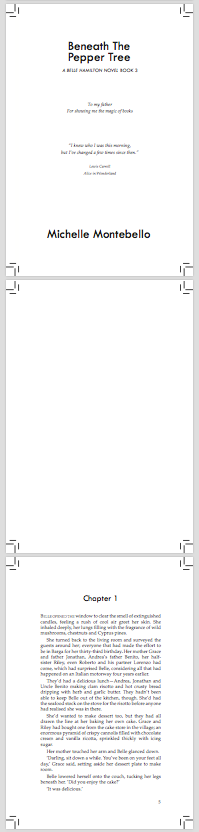
When setting up and saving your magazine's internal pages for magazine printing, you'll need to provide the files as a single-page string PDF. While crop marks and bleed are always encouraged, if your magazine is a text-based novel and has no printable elements near the edges, then all you need is a single page string PDF file in the correct size. Yes, that does also mean that you can use a Word Document if that's what you have and it's formatted properly to the correct size and in PDF.
In the below image, figure 1, you'll see three pages set-up as a single pages string with crop marks. Ie. The cross-hairs in the corners.Figure 1
magazine Cover Set Up
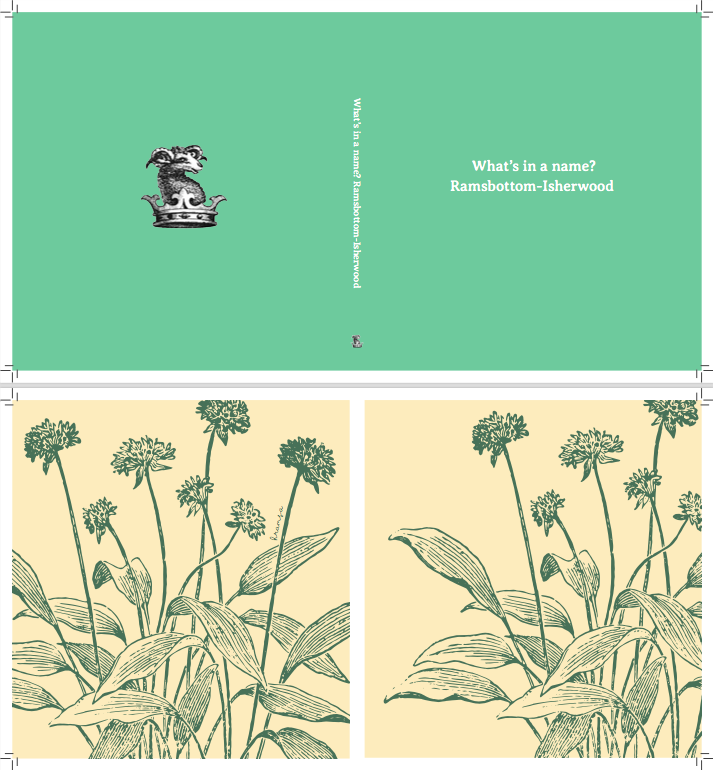
Your magazine Cover file, on the other hand, needs to be set-up as a cover spread, not a single string PDF, like in Figures 2, 3 and 4. That means for a magazine with an outer printed cover only, like Figures 2 and 3, your back cover will be positioned on the left, the spine will be in the middle and the front cover will be on the right. That also means we'll need to advise you of a spine width. The spine width is calculated by the width of each page multiplied by the number of pages in your magazine. When you quote your magazine with us here at Goliath, your quote will be saved under your email address. If you email us here we can advise you of your spine width..
If the inside of your magazine cover is also meant to be printed, see Figure 4. In this case the same rules apply to the outer cover, but a second-page spread is required for the inside. That also means the overall dimensions of the outer cover will be the same overall dimensions of the inside cover. The two biggest differences between the outer cover spread and the inner cover spread are 1. the inside cover spread does not need spine art. 2. On both sides of the inside spine, you can leave another 6mm clearance to allow for the magazine covers front and back spine hindge. and 3 where the front cover sits on the right-hand side of the outer cover, the reverse is true for the inside front cover. The inside front cover sits on the left and the inside back cover sits on the right.
Cont'd

Figure 3

Figure 4
:o)